KI-TOOL ENTDECKENAnzeige
VeröffentlichtRork
PREISMODELLKostenlos mit BezahloptionenKOSTENLOSER TARIFVerfügbar · 0 $KOSTENPFLICHTIGE OPTIONEN AB20 $ / MonatABRECHNUNGMonatlich
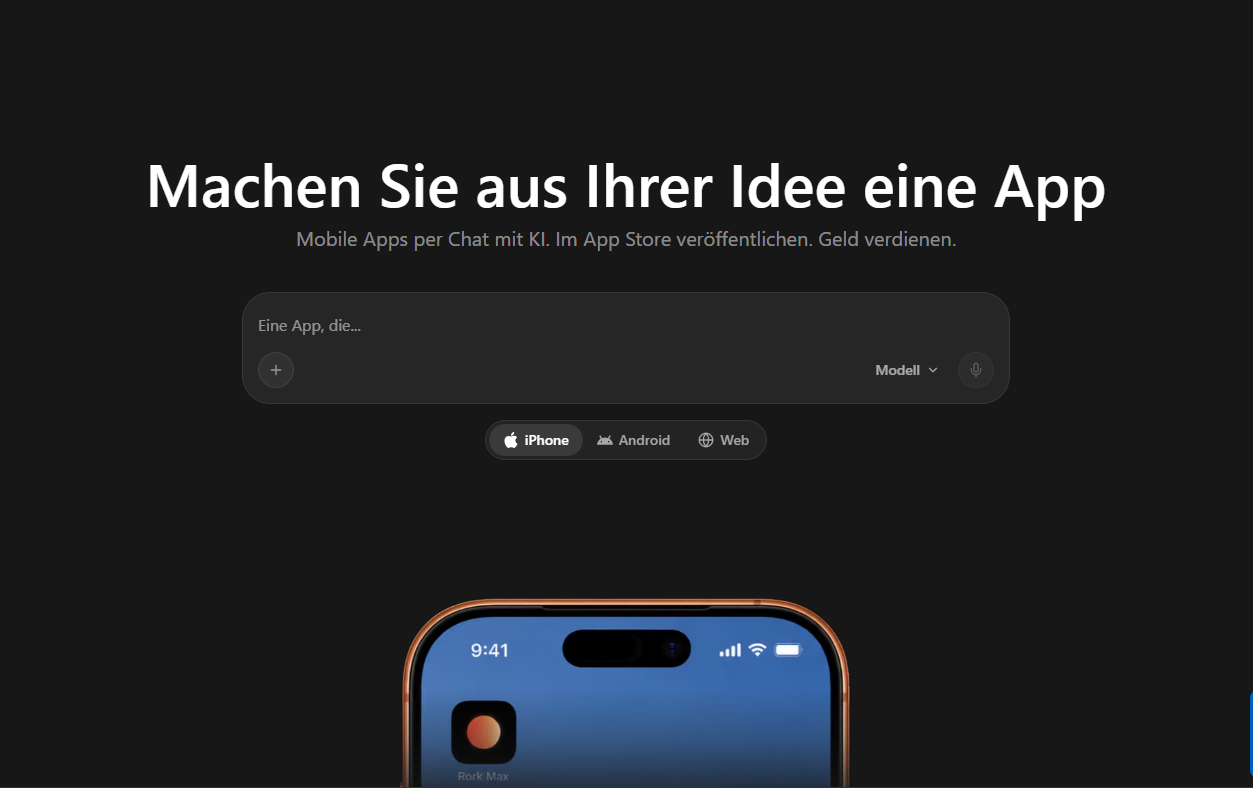
Rork builds native iOS, Android, and web apps from text descriptions, featuring previews, databases, integrations, and App Store publishing.
13 Aufrufe10 Besucher2 Website-Klicks1.940 Stimmen
Deine Meinung zählt1.940 Stimmen
Wie hilfreich findest du dieses KI-Tool?
Zum Abstimmen bitte anmelden. Die Ergebnisse sind öffentlich sichtbar.Was kann Rork?
What is Rork?
Rork is an AI-powered development platform that lets users create their own apps through simple text instructions. Instead of manually programming every feature, users describe their app idea in natural language, and Rork generates the corresponding code to support further development.
The platform suits founders, freelancers, businesses, and developers who want to build mobile applications or web apps.
Rork supports native iOS apps with SwiftUI, Android apps with Kotlin and Jetpack Compose, and web applications with React and Vite.
Key Features:
**Build Apps with AI**: Users describe their desired app and features. Rork then generates the program code, user interfaces, and necessary components. Changes can also be made via new text instructions.
**Develop iPhone Apps**: With Rork, you can create native iOS applications. The platform uses SwiftUI and supports creating apps for Apple devices.
**Create Android Apps**: Rork supports developing native Android applications with Kotlin and Jetpack Compose. This allows users to create apps that run on Android devices and can be published via Google Play.
**Develop Web Apps**: In addition to mobile apps, users can also create web apps based on React and Vite, usable via the browser.
**App Preview and Testing**: Rork offers ways to test applications during development. Depending on the platform, mobile previews, simulators, or emulators are available so users can control functions and design before publishing.
**Databases and User Accounts**: With Rork Backend, you can expand applications with databases, user login, and file storage. This enables apps with user profiles, saved content, or individual settings.
**Integrate AI Functions**: Rork can equip applications with additional AI features, including:
- AI chatbots
- Speech transcription
- Image generation
- AI-driven data processing
- Automated assistant functions
Usage and billing depend on the selected plan and services used.
**Connect External Applications**: Rork supports integrating external services via APIs. This allows apps to connect with Google Sheets, Airtable, Notion, or custom interfaces.
**Adopt App Design from Figma**: Existing Figma designs can be used as visual templates for new app interfaces, making it easier to implement pre-planned user interfaces.
**Payments and Subscriptions**: Rork supports integrating RevenueCat for in-app purchases and subscriptions, allowing app operators to offer paid features or memberships.
**Publish in App Store and Google Play**: Rork supports preparing and publishing apps through the respective platforms. This requires necessary developer accounts and approval from Apple or Google.
**Export Program Code**: In supported paid plans, users can export generated code via GitHub and continue development outside of Rork. This is particularly interesting for projects later to be processed with classic development tools.
Who is Rork suitable for?
Rork is especially interesting for:
- Founders who want to implement an app idea
- Freelancers and small businesses
- Developers who want to accelerate development processes
- Start-ups creating their first applications
- Companies with internal app projects
- Designers who want to turn interfaces into functional apps
- Users who want to develop apps without extensive programming knowledge
Is Rork free?
Rork offers a free trial to get to know the platform.
For actual app development and more extensive AI features, paid plans may be required. Billing is done via credits used for AI work, app builds, and simulator or emulator usage.
Advantages of Rork:
- Create native iPhone and Android apps with AI
- Develop web apps from text descriptions
- No extensive programming knowledge required
- Preview and test during development
- Integrate databases and user login
- Connect external APIs and AI services
- Support in-app purchases and subscriptions
- Prepare for App Store publication
- Export program code in supported plans
What are the disadvantages?
Creating complex applications may require multiple development and correction steps.
Generated program code should be checked for security, privacy, reliability, and functionality before a productive release.
Credits can also occur for AI work and build processes if the desired result is not fully achieved.
Additional developer accounts are required for App Store publications, which may incur further costs.
Furthermore, the full feature set depends on paid plans.
Rork or classic app development?
In classic app development, user interfaces, application logic, and integrations are mostly programmed manually.
Rork automates many of these steps with AI. Users can describe requirements in natural language and then continue working based on the generated app.
For complex or safety-critical applications, additional professional development work may still be required.
Conclusion: Is Rork worth it?
Rork is especially suitable for users who want to create their own mobile applications or web apps without programming every development step themselves.
The combination of AI-supported code generation, native apps, backend functions, and publishing options offers a comprehensive approach for app projects.
Anyone wanting to implement an app idea can first get to know the platform and then check which paid plan fits the planned project.
Rork is an AI-powered development platform that lets users create their own apps through simple text instructions. Instead of manually programming every feature, users describe their app idea in natural language, and Rork generates the corresponding code to support further development.
The platform suits founders, freelancers, businesses, and developers who want to build mobile applications or web apps.
Rork supports native iOS apps with SwiftUI, Android apps with Kotlin and Jetpack Compose, and web applications with React and Vite.
Key Features:
**Build Apps with AI**: Users describe their desired app and features. Rork then generates the program code, user interfaces, and necessary components. Changes can also be made via new text instructions.
**Develop iPhone Apps**: With Rork, you can create native iOS applications. The platform uses SwiftUI and supports creating apps for Apple devices.
**Create Android Apps**: Rork supports developing native Android applications with Kotlin and Jetpack Compose. This allows users to create apps that run on Android devices and can be published via Google Play.
**Develop Web Apps**: In addition to mobile apps, users can also create web apps based on React and Vite, usable via the browser.
**App Preview and Testing**: Rork offers ways to test applications during development. Depending on the platform, mobile previews, simulators, or emulators are available so users can control functions and design before publishing.
**Databases and User Accounts**: With Rork Backend, you can expand applications with databases, user login, and file storage. This enables apps with user profiles, saved content, or individual settings.
**Integrate AI Functions**: Rork can equip applications with additional AI features, including:
- AI chatbots
- Speech transcription
- Image generation
- AI-driven data processing
- Automated assistant functions
Usage and billing depend on the selected plan and services used.
**Connect External Applications**: Rork supports integrating external services via APIs. This allows apps to connect with Google Sheets, Airtable, Notion, or custom interfaces.
**Adopt App Design from Figma**: Existing Figma designs can be used as visual templates for new app interfaces, making it easier to implement pre-planned user interfaces.
**Payments and Subscriptions**: Rork supports integrating RevenueCat for in-app purchases and subscriptions, allowing app operators to offer paid features or memberships.
**Publish in App Store and Google Play**: Rork supports preparing and publishing apps through the respective platforms. This requires necessary developer accounts and approval from Apple or Google.
**Export Program Code**: In supported paid plans, users can export generated code via GitHub and continue development outside of Rork. This is particularly interesting for projects later to be processed with classic development tools.
Who is Rork suitable for?
Rork is especially interesting for:
- Founders who want to implement an app idea
- Freelancers and small businesses
- Developers who want to accelerate development processes
- Start-ups creating their first applications
- Companies with internal app projects
- Designers who want to turn interfaces into functional apps
- Users who want to develop apps without extensive programming knowledge
Is Rork free?
Rork offers a free trial to get to know the platform.
For actual app development and more extensive AI features, paid plans may be required. Billing is done via credits used for AI work, app builds, and simulator or emulator usage.
Advantages of Rork:
- Create native iPhone and Android apps with AI
- Develop web apps from text descriptions
- No extensive programming knowledge required
- Preview and test during development
- Integrate databases and user login
- Connect external APIs and AI services
- Support in-app purchases and subscriptions
- Prepare for App Store publication
- Export program code in supported plans
What are the disadvantages?
Creating complex applications may require multiple development and correction steps.
Generated program code should be checked for security, privacy, reliability, and functionality before a productive release.
Credits can also occur for AI work and build processes if the desired result is not fully achieved.
Additional developer accounts are required for App Store publications, which may incur further costs.
Furthermore, the full feature set depends on paid plans.
Rork or classic app development?
In classic app development, user interfaces, application logic, and integrations are mostly programmed manually.
Rork automates many of these steps with AI. Users can describe requirements in natural language and then continue working based on the generated app.
For complex or safety-critical applications, additional professional development work may still be required.
Conclusion: Is Rork worth it?
Rork is especially suitable for users who want to create their own mobile applications or web apps without programming every development step themselves.
The combination of AI-supported code generation, native apps, backend functions, and publishing options offers a comprehensive approach for app projects.
Anyone wanting to implement an app idea can first get to know the platform and then check which paid plan fits the planned project.
Bewertungen & Erfahrungen 0
Noch keine Bewertungen vorhanden. Teile deine Erfahrung mit diesem Tool.
Anmelden, um eine Bewertung zu schreiben ↗